


Fever: Events & Tickets
4.74.07K Reviews
App Specs
- Version
- 5.251.1
- Updated On
- License
- Free
- Downloads
- 10,000,000+
- Developer
- Fever Labs
- Categories
- Events
- Platform
- Android, iOS
Screenshots

 Analysis by AppCompare
I tend to open an events app when I have a gap in my plans, not when I already know exactly what I want to see. That is where Fever: Events & Tickets makes sense to me: it helps turn a vague “let’s do something” into a short list of possibilities, from live entertainment to unusual outings. It is a free events app from Fever Labs, and its reach across cities including New York, Los Angeles, Chicago, Washington, DC, and Miami makes it most useful for people who want a changing view of what is happening around them.
My best results came from treating it as a discovery tool first and a booking tool second. I browse with a rough idea of the day or mood, open a few promising listings, and compare the practical details before committing. That small pause matters: a polished event card can catch my eye, but the right choice still depends on where it is, when it fits, and whether the description answers the questions I have.
A practical routine for finding something to do
For a weekend search, I start broad rather than entering with a fixed category in mind. I check what is available nearby, narrow the list by date, then look across different kinds of outings instead of scrolling through one long stream. This works particularly well when I am arranging something with another person and we have not agreed on a specific activity yet.
For example, if a friend messages on a Thursday asking about Saturday, I can browse the date, send a couple of options, and let us choose based on the event details. That is a more useful workflow than forwarding a random search result from somewhere else: the app gives us one place to explore and share ideas, while the date filter keeps options that do not fit the plan out of the way.
I would still check the event page carefully before buying. If the venue or performers are described only briefly, I would look for enough context to feel confident rather than assume that the title tells the whole story. A listing can spark the idea, but it cannot make the decision for me.
Small habits that make browsing more useful
I get more from the recommendations when I use them as prompts, not as a complete picture of the city. A tailored suggestion can surface an event that matches a broad interest, while a curated collection can nudge me toward something I would not have searched for by name. I like that combination, but I do not treat either as proof that the app has found every worthwhile option.
One useful habit is to decide what matters before browsing: a particular day, a general mood, or whether the plan should be familiar or novel. Then I can use the filters and collections with a purpose instead of tapping through whatever looks bright. If the first results do not fit, I change the date or loosen my idea of the activity rather than repeatedly scrolling the same set.
Worth Reading Before You Choose

Flipboard Shows What News Apps Must Do Beyond the Feed

Switching to Android Auto Means Rethinking Your Driving Routine

Google Calendar Makes a Crowded Week Easier to Manage

Ludo King Makes the Most of the Minutes Between Plans

Baby Panda World Brings Quick Play to Modern Phones, but Its Game Library Feels Busy

ESPN’s Live Game View Makes Following Close Games Easier
Sharing a shortlist can also make group planning less awkward. Rather than asking friends to search from scratch, I can send event details for them to consider. I would do that after checking the listing myself, especially when the description is brief; it avoids presenting an appealing image as if it were all the information a group needs.
Where discovery has limits
The app is strongest when I am open to suggestions and when its event pages give enough detail to compare options. It is less satisfying if I already know the exact venue or performer and want a deep, exhaustive search across every possible source. In that situation, I would use Fever alongside a venue’s own information or another event calendar rather than assume one app covers the whole scene.
There is also a trade-off in curated discovery: it saves effort, but the selection is still a selection. A city’s independent listings and smaller happenings may not all appear in the same place, and a recommendation shaped by my interests can keep showing me familiar territory. I make a point of checking categories outside my usual tastes now and then, because the app is more interesting when I use it to widen my choices rather than simply confirm them.
Fever has a 4.7 average from around 128,000 ratings and more than 10 million installs, so it is clearly used by a large audience. I read that as a sign that the basic discovery-and-ticketing idea works for many people, not as a guarantee that every listing will suit me. It is rated Teen, and its current version is 5.179.0, which is useful context if I am checking compatibility before installing.
Discovering What's Happening Around You
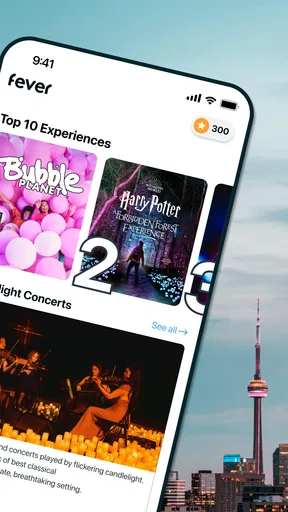
As soon as I opened Fever: Events & Tickets, I was greeted with a sleek interface that makes browsing events a breeze. The app uses your location to show what's happening nearby, which is super handy if you're like me and often have a "what should I do this weekend?" moment.
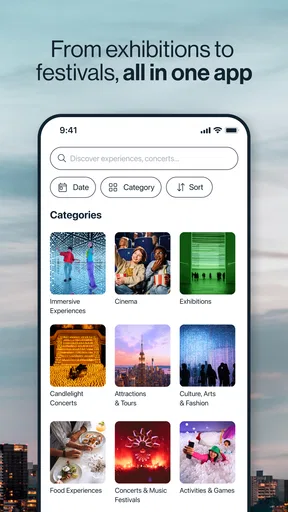
The app categorizes events by type, such as music, theater, and nightlife, and you can also filter by date. I loved how intuitive it was to navigate. No more endless scrolling through irrelevant events—Fever gets right to the point.
Booking Made Simple
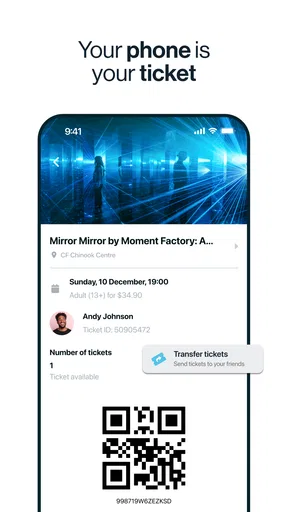
Once I found a concert I was interested in, booking a ticket was just a few taps away. The checkout process was straightforward, and I appreciated the option to pay with various methods. Plus, having the ticket directly on my phone means no more printing hassles.
One feature that stood out to me was the ability to invite friends directly from the app. It sends a quick message with all the event details, which is perfect for those last-minute plans.
Personalized Recommendations
Fever takes personalization to another level. The more you use it, the better it gets at recommending events tailored to your tastes. If you're into indie bands, don't be surprised if Fever starts suggesting all the underground gigs in town. It’s like the app is reading your mind!
Another cool feature is the curated collections. These are lists of events handpicked by Fever’s team, highlighting unique experiences you might not find elsewhere. I found this especially useful when looking for something out of the ordinary.
A Few Quirks
While the app is mostly smooth sailing, I did notice that some events had limited information available. A bit more detail on the venue or the performers would be a welcome addition. But honestly, it’s a minor quibble in an otherwise stellar app.
Who I Think Will Get the Most Out of It
I would recommend it most to people who like having a few fresh ideas ready for a free evening, couples who take turns choosing plans, and friends who want to settle on an outing without a long back-and-forth. It also suits visitors who want a starting point for exploring a city: browsing can reveal the kinds of experiences on offer before they have learned the local venues and neighborhoods.
It is less compelling for someone who wants a comprehensive public calendar, follows niche events that are usually promoted through specialist communities, or prefers to buy directly from a venue after researching elsewhere. I would also skip using it as my only planning source when a listing leaves important questions unanswered. Its value is in reducing the effort of discovery, not replacing judgment or every other source.
Questions I would settle before checkout
When deciding whether to book, I first check that the event date works and that I understand the venue information shown on the listing. If I am going with friends, I share the details early enough for them to check the same practical points. A quick invitation is convenient, but it does not remove the need to agree on timing and the plan itself.
People often wonder whether they need to pay just to browse. The app is free to download, so I can explore before deciding whether an event is worth booking. I would separate that from the cost of attending: a free app does not mean every event is free, and I would check the individual event’s ticket details before making plans.
Another sensible question is whether it works for a particular city. Its focus includes several major US destinations and more, but the usefulness of discovery naturally depends on what is listed where you are. I would open it and search my intended area before relying on it for a specific night, especially if I am planning around a less common activity.
Making the app fit the way I plan
I would not spend time trying to build an elaborate system around it. A repeatable routine is enough: browse by date, save attention for listings that fit the group and location, read the details, then share the strongest candidates. On a quiet week, I might start with a curated collection; when I have a fixed night available, I would begin with that date and compare the results.
That distinction helps avoid a common trap with event discovery apps: browsing indefinitely because there is always another appealing possibility. I set a practical limit for myself by choosing what the plan needs to satisfy first, then stopping when I find an option that meets those needs. Fever can make the search feel light, but a little structure makes it more likely that browsing turns into an actual outing.
I would also keep expectations realistic about personalization. Recommendations can be a useful shortcut when they match my tastes, but I do not assume they represent the full range of what is happening or that every suggestion will be relevant. If the feed feels repetitive, changing the category or looking through a collection is more useful than expecting the same recommendations to suddenly become a complete local guide.
My verdict after using it as a planner
Released on March 19, 2014, and compatible with Android 7.0 or later, Fever has had time to build a recognizable approach to local event discovery. What I appreciate most is the straightforward path from browsing to sharing an idea and, when I am ready, keeping a ticket on my phone. What I appreciate less is that some event pages need more context before I feel ready to commit.
Compared with searching social posts, venue calendars, and general listings separately, Fever gives me a more focused place to start and a quicker way to pass an option to friends. Compared with a venue’s own ticketing information, it may not answer every detailed question I have. I see it as a useful front door to making plans, with other sources available when the particulars matter.
Overall, I would keep Fever for spontaneous evenings and early-stage weekend planning, especially when I want to discover something beyond my usual routine. I would not depend on it alone for niche listings or for details that a short event description does not cover. Used with that balance, it makes finding a possible plan easier without pretending to choose the perfect night for me.
Wrapping It Up
Overall, Fever: Events & Tickets is a must-have for anyone who loves staying in the loop with local events. It’s easy to use, packed with features, and constantly evolving to make sure you never miss out. Whether you're planning a night out or just browsing for fun, Fever makes it all feel effortless. Give it a try, and who knows, you might just discover your next favorite event!
Pros
- Easy event discovery with personalized recommendations.
- Seamless ticket purchase and checkout process.
- User-friendly interface with intuitive navigation.
- Wide variety of events across multiple categories.
- Real-time updates and notifications for events.
Cons
- Limited customer support response time.
- Occasional app crashes on older devices.
- Some events might be region-restricted.
- In-app promotions can be overwhelming.
- Refund policy can be unclear at times.
FAQs for Fever: Events & Tickets
What is Fever: Events & Tickets, and how does it work?
Fever: Events & Tickets is a mobile application designed to help users discover and purchase tickets for a wide range of events, from concerts and theater shows to unique local experiences. Users can browse curated lists of events based on their interests and location, making it easy to find something appealing. Once an event is selected, tickets can be purchased directly through the app, often with exclusive discounts.
Is Fever available in my city?
Fever is continually expanding its reach, but its availability depends on the city you're in. Major cities like New York, London, and Madrid are already supported, offering a rich variety of events. To find out if it covers your area, you can download the app and explore its offerings or check the Fever website for the latest list of supported locations.
Are the ticket prices on Fever competitive?
Yes, Fever often provides competitive pricing and exclusive deals that might not be available elsewhere. The app regularly features promotions and discounts on tickets, making it a cost-effective choice for event-goers. Users can compare prices within the app and sometimes find unique experiences at reduced rates, enhancing the value of their purchase.
How secure is the payment process on Fever?
Fever ensures a secure payment process by employing industry-standard encryption and security protocols to protect users' financial information. The app supports various payment methods, including credit cards and digital wallets, providing a safe and convenient checkout experience. Users can trust that their transactions are handled with care and confidentiality.
Can I get a refund if I can't attend an event?
Fever's refund policy varies depending on the event and the organizer's terms and conditions. Typically, refunds are not guaranteed, but some events may offer flexibility. It's crucial to review the specific refund policy for each ticket before purchase. If an event is canceled, Fever usually provides a full refund or alternative options for attendees.


